Building the interface
To be able to place the call, you need to add three elements to the screen:
- A
TextViewto show the connection status - A
Buttonto start the call - A
Buttonto end the call
Open the app/res/layout/activity_main.xml file. Click the Code button in the top right corner:
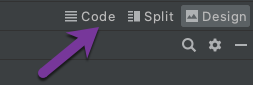
Replace the file contents with the following:
<?xml version="1.0" encoding="utf-8"?>
<LinearLayout xmlns:android="http://schemas.android.com/apk/res/android"
        xmlns:app="http://schemas.android.com/apk/res-auto"
        xmlns:tools="http://schemas.android.com/tools"
        android:layout_width="match_parent"
        android:layout_height="match_parent"
        android:orientation="vertical"
        android:gravity="center"
        tools:context=".MainActivity">

    <TextView
            android:id="@+id/connectionStatusTextView"
            android:layout_width="wrap_content"
            android:layout_height="wrap_content"
            android:layout_marginBottom="20dp"
            tools:text="Connection status"/>

    <Button
            android:id="@+id/startCallButton"
            android:layout_width="wrap_content"
            android:layout_height="wrap_content"
            android:layout_marginBottom="20dp"
            android:text="Start call"
            android:visibility="gone"
            tools:visibility="visible"/>

    <Button
            android:id="@+id/endCallButton"
            android:layout_width="wrap_content"
            android:layout_height="wrap_content"
            android:text="End call"
            android:visibility="gone"
            tools:visibility="visible"/>
</LinearLayout>
You will control the view using code, so you have to store references to the views. Add these properties at the top of the MainActivity class:
private lateinit var startCallButton: Button
private lateinit var endCallButton: Button
private lateinit var connectionStatusTextView: TextView
Now you need to assign views to previously added properties and add callbacks to the buttons. Add below code to the onCreate method inside MainActivity class (below request permissions code):
// init views
startCallButton = findViewById(R.id.startCallButton)
endCallButton = findViewById(R.id.endCallButton)
connectionStatusTextView = findViewById(R.id.connectionStatusTextView)

startCallButton.setOnClickListener {
        startCall()
}

endCallButton.setOnClickListener {
        hangup()
}
To make code compile add these two empty methods in the MainActivity class:
@SuppressLint("MissingPermission")
private fun startCall() {
        // TODO: update body
}

private fun hangup() {
        // TODO: update body
}
You will fill the body of these methods in the following steps of this tutorial.
Build and Run
Run the project again (Ctrl + R).
Notice that buttons are hidden by default:
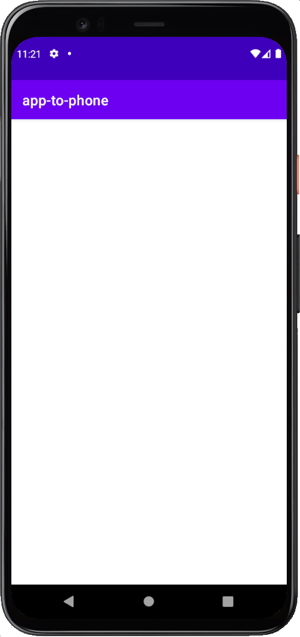
The state of the connection will be displayed and the START CALL button will be shown after logging in the user.
Making an in-app voice call
Make a voice call from a android app to a phone using the Android Client SDK.